
What is Rental Guardian?
Rental Guardian is a built-in protection solution in Jurny that replaces traditional security deposits with a seamless, guest-friendly coverage model.
Jurny gives you access to two industry-leading protection programs that cover both sides, built directly into your account and can be activated on every reservation.
-
Damage Protection (for your property)
-
Travel Insurance (for your guests)
This allows you to protect your assets while improving the booking experience.
With Rental Guardian, you no longer need to rely on large security deposits that can slow down bookings.
What Rental Guardian Offers
Rental Guardian includes two key components:
-
Damage Protection – Protects your property and your liability. You pay nothing - the guest covers it.
-
Travel Insurance – Protects your guest's trip. Reduces cancellations and builds trust at booking.
How to Enable Rental Guardian in Jurny
Follow these steps to turn on Rental Guardian for your listings:
Step 1: Go to Listings
-
Navigate to the Listing tab in your Jurny dashboard
-
Click on the listing you want to configure
-
Click on the Pricing & Fees tab inside the listing
Step 2: Find Property Protection
-
Click the Security Deposit tab
-
Locate the Property Protection section
-
Click Edit
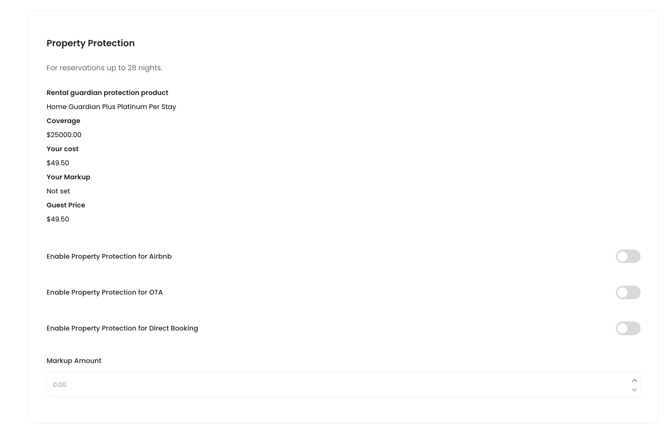
Step 4: Enable Rental Guardian
You will see three toggle options. Turn ON the channels where you want Rental Guardian applied:
-
Airbnb bookings
-
Other OTA bookings
-
Direct bookings
Step 5: Set Your Markup
-
In the Amount field, add your markup on top of the $49.50 flat rate charged by Rental Guardian
-
This markup is 100% profit for you
Example: If you add $20, the guest pays $69.50 total and you keep the $20.
Step 6: Save & Assign
-
Click Save and Assign to apply the changes
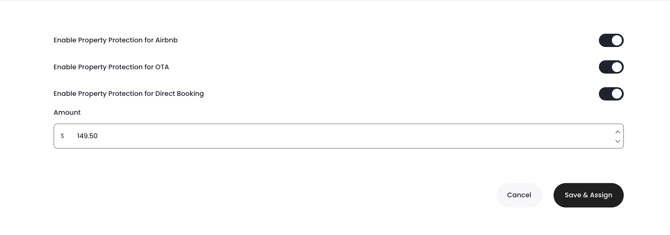
Note: Changes will apply to future bookings after saving.
Damage Protection Coverage Breakdown
Here’s exactly what is covered under Rental Guardian:
🛋️ Contents Damage
Broken TVs, furniture damage, appliance failures, carpet stains. Every claim above $25 gets reimbursed - $0 deductible.
-
Covered up to $25,000
-
$0 deductible; $25 minimum claim.
🏠 Real Property Damage
Kitchen fires, water overflow and major structural damage from rental activity.
-
Covered up to $1,000,000
- $2500 deductible; Covers major peril from rental activity.
⚖️ Host Liability Protection
If a guest is injured during their stay and files a lawsuit against you or the homeowner, this coverage protects you from bodily injury claims.
-
Covered up to $1,000,000
- $2500 deductible; Covers major peril from rental activity.
🐜 Bed Bug Coverage
Extermination, replacement of ruined furnishings, guest relocation to a hotel, and lost rental income after the 72-hour period.
-
Covered up to $15,000
How the pricing works
The fee is $49.50 per reservation, charged to the guest as a management fee on OTAs — not labeled as insurance. You can mark it up and keep the difference. Your cost: $0.
Travel Insurance Overview
Rental Guardian also includes travel insurance for guests, which helps protect their trip and reduces booking hesitation. Offered at booking on your direct booking site or as a post-booking upsell through NIA, Travel Insurance gives your guests peace of mind at their own cost — and gives you protection against last-minute cancellations eating into your revenue. The guest covers 100% of the insurance premium.
✈️ Option 1: STANDARD COVERAGE – Travel Protection + Cancel For Any Reason
-
Cost: 7% of trip cost (paid by the guest)
Includes:
-
Trip cancellation & interruption
-
Medical expenses during travel
-
Emergency evacuation coverage
-
Cancel For Any Reason flexibility
Eligibility:
-
Available to United States residents
Purchase Window:
-
If booking 30+ days in advance → can purchase up to 30 days before arrival
-
If booking within 30 days → must purchase within 5 days of booking
✈️ Option 2: MAXIMUM FLEXIBILITY (Most Popular)
-
Cost: 10.8% of trip cost (paid by the guest)
Includes:
-
Everything in Standard Coverage, plus:
-
Cancel for literally any reason (no justification needed)
-
Partial reimbursement of non-refundable costs
-
Eligibility:
-
Available to US residents
Purchase Window:
-
Must typically be purchased within 14 days of booking
-
Not available within 30 days of check-in
Why This Matters for Your Revenue
When guests have Cancel For Any Reason coverage:
-
They are significantly more likely to complete a booking
-
They are less likely to cancel last-minute
-
You reduce vacancy risk and lost revenue
Insurance removes friction at checkout and gives guests the confidence to book now instead of delaying.
Benefits for Hosts
-
No need to manage or collect security deposits
-
Protection up to $1M+ in damages and liability
-
Faster, smoother claims process
-
Increased booking conversion rates
Benefits for Guests
-
No large upfront deposit
-
Travel protection included
-
Flexible cancellation benefits
How to File a Claim
Filing a damage claim is 3 steps. No back and forth with guests. No uncomfortable conversations. Document it, submit it, get reimbursed.
Step 1: Document the damage within 14 days of checkout
-
Collect at least one photo of the damage and at least one paid invoice or receipt. Accepted formats: PDF, PNG, JPEG, GIF. All invoices must clearly show "paid in full."
- You have a 14 day window to file a claim from the guest check out day.
Step 2: Submit the claim directly through Jurny
- Open the reservation in Jurny, head to the Insurance tab, and if coverage is active you'll see the option to submit a claim right there. No external forms or portals - it's all inside your Jurny account. Once submitted, Rental Guardian will contact you directly to handle the rest.
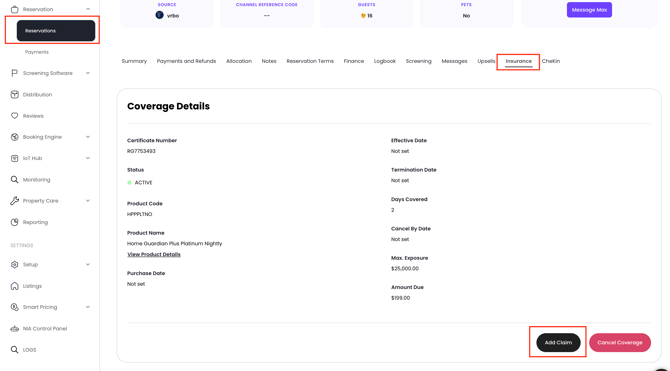
- You have 45 days to submit all documentation after filing
-
Fill out all required fields
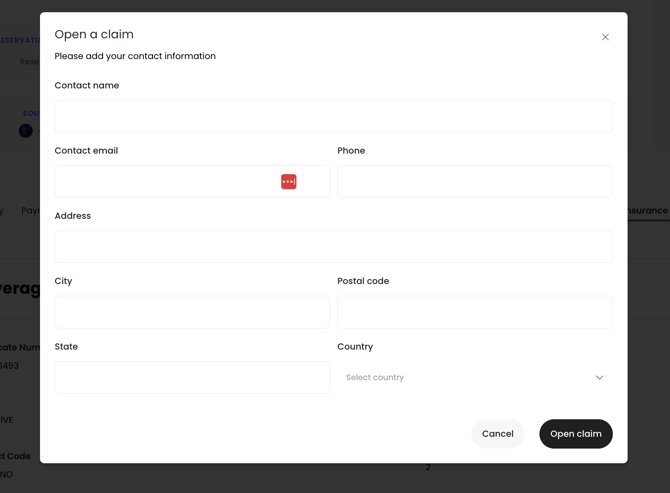
Step 3: Get reimbursed via direct deposit or check
-
Set up ACH for the fastest payout — direct to your account. Paper check takes 10-20 business days. Once the system detects both a photo and invoice uploaded, the claim moves to IN REVIEW automatically.
Need help with a claim? Rental Guardian Support: (888) 885-5550 • support@rentalguardian.com - For guest travel claims: (833) 610-0736 (US) playtravelprotection.com
If you need help or have any questions, don’t hesitate to reach out. Contact your Customer Success Manager or our support team at support.jurny.com – we’re happy to assist.