
Quick Navigation Index
To easily navigate through this guide, click on any of the sections below to jump directly to the information you need:
What Is Screening Software in Jurny?
Screening software helps you:
-
Verify guest identity
-
Reduce fraud and party risk
-
Protect your properties
-
Automate compliance-related processes
In Jurny, screening tools integrate directly with reservations and guest communication flows.
Autohost vs Chekin: Main Differences
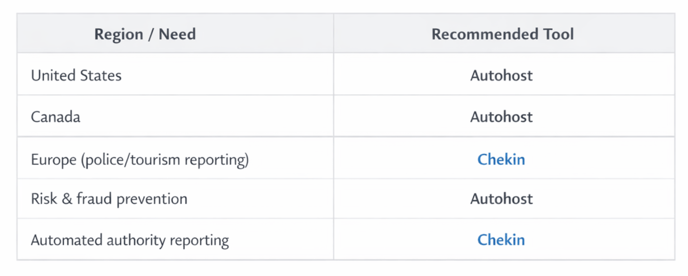
Jurny supports two screening tools. Autohost focuses on guest risk screening and security for North America, while Chekin focuses on automated guest registration and reporting to authorities, primarily in Europe.
Autohost
-
Designed primarily for US and Canadian clients
-
Focuses on:
-
Guest risk assessment
-
Fraud prevention
-
Chargeback reduction
-
Security deposit handling
-
-
Ideal for:
-
Short-term rentals
-
Hosts focused on risk mitigation
-
-
Integrates deeply with Stripe and booking workflows
Chekin
-
Designed primarily for European clients
-
Specializes in:
-
Automated guest registration
-
Sending guest data to local authorities
-
Police and tourism compliance
-
-
Fully automates mandatory reporting in many European countries
-
Also supports:
-
US and other regions
-
ID verification and guest data collection (region-dependent)
-
Note:
Chekin is the preferred option when legal reporting to authorities is required.
Which One Should You Choose?
Tip:
You only need one screening tool per account, based on your primary operational region.
Set Up Your Screening Tool
Choose the guide that applies to your setup:
👉 How to Set Up Autohost in Jurny
Step-by-step guide to enable guest screening, risk scoring, and security workflows
👉 How to Set Up Chekin in Jurny
Step-by-step guide to configure guest registration and authority reporting
Next Step
Once screening is configured:
➡️ You’re ready to finalize your setup and start operating with full automation and protection.
If you need help or have any questions, don’t hesitate to reach out.
Contact your Customer Success Manager or our support team at support.jurny.com – we’re happy to assist.