
Quick Navigation Index
- OTA Cancellation Policies on Reservations
- New Payment Statuses in Reservations
- Ready-to-Use Payment Guest Templates
Overview
We’re excited to introduce three major enhancements designed to give your team more control, clearer visibility, and smoother guest communication inside Jurny MOS:
- Cancellation policies now sync directly from OTA bookings
- Expanded payment statuses for better transaction tracking
- Prebuilt guest templates for payment-related communication
These upgrades help your team work faster, reduce manual effort, and create a better guest experience.
OTA Cancellation Policies Now Display on Reservations
Reservation details just got smarter. For OTA bookings, Jurny MOS now displays the actual cancellation/refund policy pulled directly from your connected channel source.
Where to Find It
- Open the reservation in Jurny MOS
- Go to the Summary tab
- Scroll to the bottom
- View the Refund Policy section

What Changed
Previously, this section typically displayed your default Jurny refund policy (commonly used for direct bookings).
Now:
- Direct bookings will still follow your Jurny-configured policy
- OTA bookings will now display the policy assigned by the OTA/channel source used for that reservation
When processing refunds, the system now considers the OTA cancellation policy tied to the booking, not only the default Jurny refund policy.
New Payment Statuses Added
Tracking payments is now clearer, cleaner, and more powerful with new transaction statuses in the reservation view.
Where to Find Them
- Open a reservation
- Select the Payments and Refunds tab
New Statuses Explained
Refunded
A payment has been successfully refunded.
- Refunds now appear separately from the original payment, making transaction history much easier to understand.
Released
Perfect for pre-authorizations.
- This means a held amount was released back to the guest instead of being charged.
Failed
A payment attempt didn’t go through.
- This could be caused by a declined card, expired payment method, insufficient funds, or gateway issue.
Charged by the Portal
The booking platform handled the payment directly.
Common examples include:
- Airbnb reservations
- Virtual Credit Cards (VCC)
- OTA-collected payments
Tip: These clearer statuses make it faster to troubleshoot issues, answer guest questions, and reconcile payments.
Ready-to-Use Guest Payment Templates
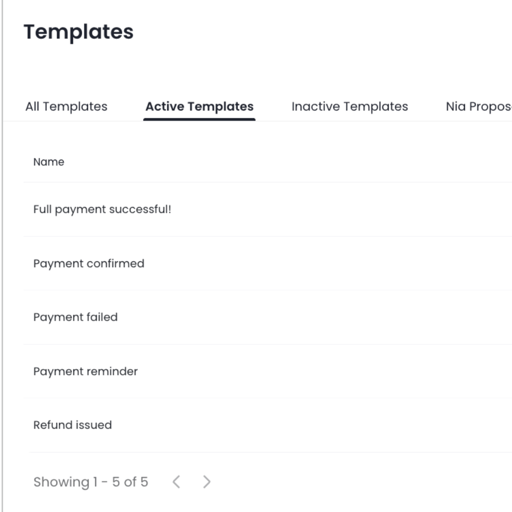
New prebuilt guest communication templates are now available for payment-related events.
We’ve added prebuilt templates for common payment events so you can automate messages in minutes.
Where to Find Templates
- Go to Inbox
- Select Inbox Settings
- Click Templates
- Open the All Templates tab
What’s Included
Templates are available for common payment scenarios such as:
- Payment confirmations
- Successful Payments
- Payment reminders
- Payment failures
- Refund Issued
Fully Customizable
Every template can be tailored to fit your brand and workflow.
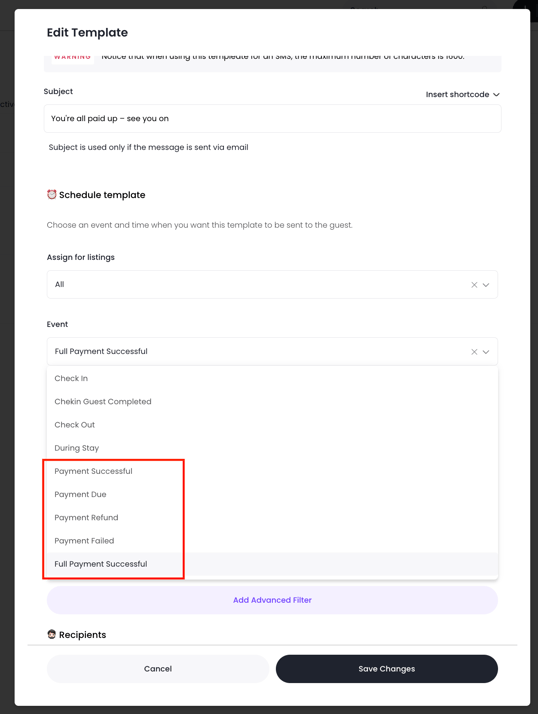
You can update:
- Message wording
- Short codes / variables
- Delivery timing
- Trigger events - new trigger events have been added based on payment statuses of every reservation.
Tip: Use existing templates as a starting point, then tailor messaging to your brand voice.
Need Help?
If you need help or have any questions, don’t hesitate to reach out. Contact your Customer Success Manager or our support team at support.jurny.com – we’re happy to assist.