
What is NIA Self-Learning?
NIA Self-Learning is a newly released capability that allows NIA to learn from guest conversations and automatically create updated FAQs.
Instead of manually writing every FAQ, NIA reviews real interactions, identifies common topics, and builds smarter responses based on what guests are actually asking.
This means:
- Faster AI improvements
- More accurate guest replies
- Less manual setup
- Smarter automation over time
Why This Feature Matters
Traditional FAQ management requires teams to manually monitor chats and update answers.
With Self-Learning, NIA helps do that work for you by turning conversation data into usable knowledge.
Common examples:
- Amenities questions
- Check-in / check-out questions
- Parking requests
- WiFi details
- House rules
- Booking changes
- Property-specific concerns
How Self-Learning Works
NIA Self-Learning becomes more powerful with every guest conversation. As your team continues responding to messages naturally throughout the day, NIA quietly analyzes recurring questions, common requests, and valuable response patterns to build smarter, more relevant FAQs automatically. The more conversations your team handles, the stronger and more accurate NIA becomes. This will allow NIA to continuously evolve based on real guest needs, not guesswork.
How to turn on Self-Generating FAQs
Inside NIA FAQ Settings, you will see two operating modes:
1. Manual Review Mode
Generated FAQs can be reviewed before being applied.
2. Self-Learning Mode
NIA continuously improves FAQs using conversation learnings with less manual intervention.
Just make sure that you have the Self-Learning Mode checked.
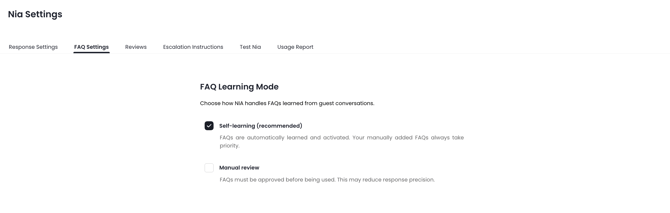
There’s nothing extra you need to do! Just keep managing guest conversations as you normally would. Every message exchanged helps train NIA to better understand what guests are asking and how your team responds. Over time, this creates a richer knowledge base filled with real-world FAQs tailored to your operations. Simply by staying engaged with your inbox, you’re actively helping NIA become faster, smarter, and more helpful with every interaction.
Manual FAQ Refresh Option
If you don't want to wait for the next automatic cycle, you can manually generate new FAQs.
Steps:
- Go to NIA Settings
- Click Add New on the right side of the page
- Click the AI-Generated FAQs
- Click the Generate My FAQs Now button

NIA will create a new FAQ set using the same learning flow
Review & Validate Suggested FAQs While Editing Messages
NIA now helps improve your knowledge base directly from the inbox experience. When editing a guest message, the system may prompt you to validate whether your updated response should be used to improve or update an FAQ. This creates a seamless workflow where everyday message improvements can instantly strengthen your AI knowledge.
Instead of managing FAQs separately, your team can refine answers in real time while handling conversations—turning daily operations into continuous optimization.
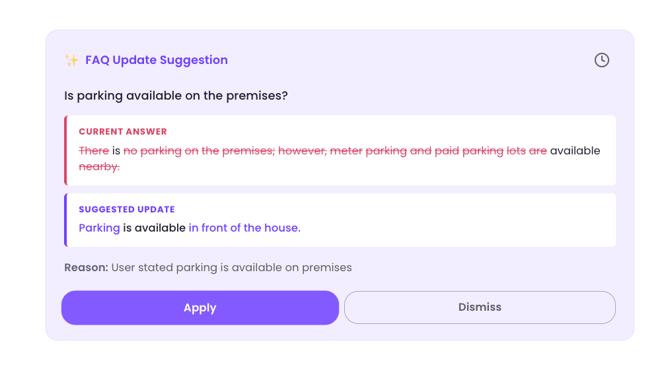
Note: Self-Learning FAQs are already be active in NIA responses, but reviewing and approving them ensures they are fully validated by your team.
If you need help or have any questions, don’t hesitate to reach out. Contact your Customer Success Manager or our support team at support.jurny.com – we’re happy to assist.