
Overview
What You Can Do with Jurny MCP
The possibilities are endless, but here are just a few powerful ways to put your AI to work:
Deep Reservation Insights
Instantly retrieve booking details, check guest statuses, or search through your reservation history in seconds.
Financial Control at Your Fingertips
Ask about payment statuses, process guest refunds with a simple command, or generate polished quotes for prospective bookings on demand.
Unit & Inventory Management
Get real-time information on your units and property listings without leaving your chat interface.
Guest Reputation & Reviews
Skip the blank page. Your AI can fetch recent guest reviews and even help respond directly while maintaining your brand standards.
Before You Start
Make sure you have:
- Access to your Jurny account
- Access to you AI Tool (Desktop app or Web)
- Permission to create API integrations
- A secure place to save credentials temporarily
Step 1: Open Your Jurny Profile
Log in to your Jurny account and go to your profile.
Step 2: Create an Integration Client
- Open the API Integrations tab.
- Click Add Integration Client.
- Complete the fields below:
- Name: Choose any name you like (example: Claude MCP Connector)
- MCP URL:
- Production:
https://mcp.jurny.com/mcp
- Production:
- Click Create.
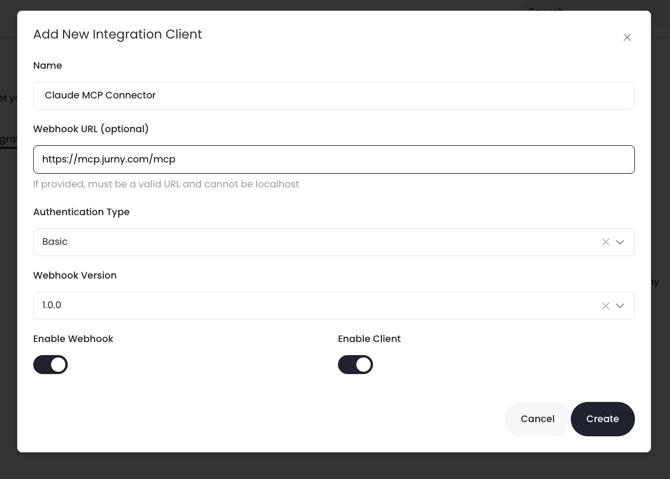
Step 3: Save Your Client Secret
After creating the integration, Jurny will display your credentials.
You will need:
- Client ID
- Client Secret
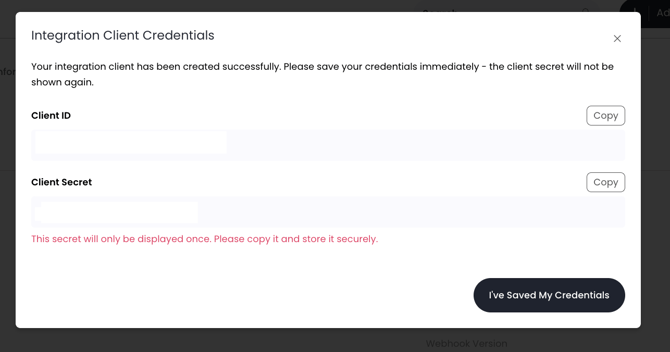
Warning: The Client Secret is only shown once. Copy and save it immediately in a secure location before leaving the page.
Step 4: Open your favorite AI Tool and Add your custom Connector
For Claude:
- Open Claude (Desktop or Web).
- From the left sidebar, click Customize.
- Select Connectors.
- Click the + icon in the top-right corner.
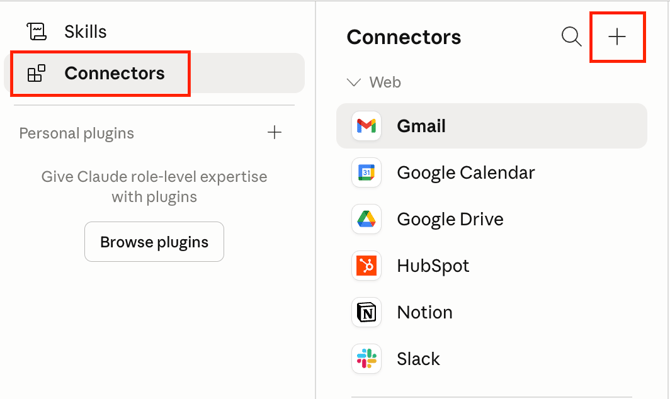
- Click JOS MCP - Prod from the list of Connectors then click Connect
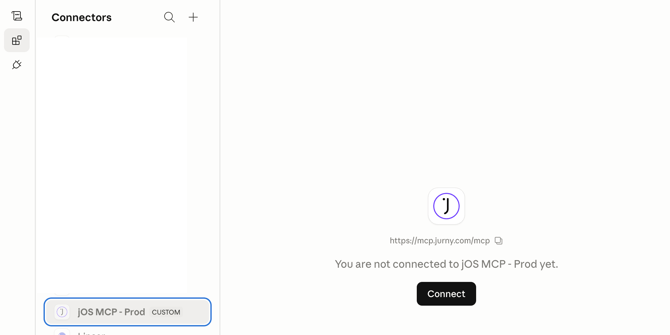
- Add OAuth Client ID: Your Jurny Client ID and your OAuth Client Secret: Your Jurny Client Secret from Step 3
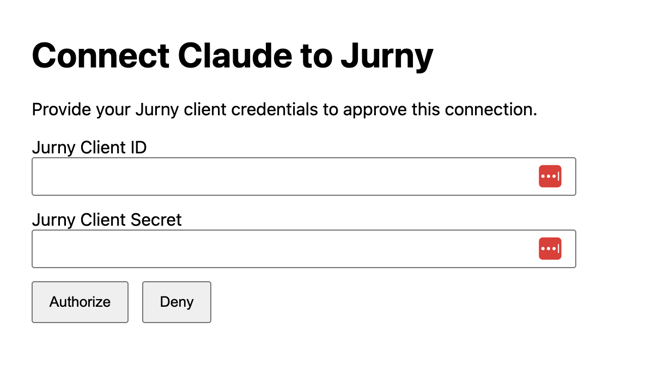
- Click Authorize.
- Review the available tools.
- You’ll see a full menu of available tools — each one representing a specific action Claude can take on your behalf. You can toggle permissions for each tool individually, giving you complete control over what Claude is allowed to do.
Available Tools
|
Tool Name |
What It Does |
|---|---|
|
get_reservations |
Retrieve reservations and booking details |
|
get_units |
Fetch real-time data on your units and listings |
|
get_reviews |
Pull the latest guest reviews from your account |
|
reply_to_review |
Respond to guest reviews directly through Claude |
|
cancel_reservation |
Cancel a reservation with a simple command |
|
update_reservation |
Modify reservation details on the fly |
|
create_quote |
Generate professional quotes for prospective guests |
|
send_guest_message |
Send messages to guests from within Claude |
|
get_reservation_payments |
Check payment status for any reservation |
|
refund_payment |
Process guest refunds without leaving your chat |
- Enable or customize permissions based on your workflow needs.
Works with More AI Platforms — Not Just Claude
Here’s the best part: the Jurny MCP isn’t locked to a single platform. Claude is a great place to start, but if you already have a favorite AI workspace, Cursor, or any other LLM-powered assistant that supports custom connectors, you can plug Jurny straight into that too.
The integration works the same way across the board. Grab your Jurny MCP credentials from Step 1, check your preferred platform’s documentation for adding a custom connector, and you’re in business. One set of credentials. Any AI. Endless possibilities.
🔌 Compatible AI PlatformsAny AI assistant or coding tool that supports the Model Context Protocol (MCP) or custom connector setup can be wired up to Jurny — including:
Simply follow your chosen platform’s guide for adding a custom connector and use your Jurny credentials during setup. Your AI, your rules. |
If you need help or have any questions, don’t hesitate to reach out. Contact your Customer Success Manager or our support team at support.jurny.com – we’re happy to assist.