
Overview
We're excited to introduce Airbnb Upsells in Jurny.
Previously, Airbnb bookings could not support upsells. With this release, hosts can now charge guests for additional services using Airbnb's Resolution Center while keeping the entire process connected to Jurny.
Although most of the workflow is automated, Airbnb requires one manual step.
How the Airbnb Upsell Process Works
Step 1: Guest Receives or Requests an Upsell
An upsell can begin in two ways:
- The guest asks for an additional service (for example, early check-in or late checkout).
- NIA automatically offers an upsell based on your configured automations.
In both cases:
- The conversation happens directly in the Airbnb message thread.
- The offer is sent as plain text.
- The guest sees the service and price before deciding.
Step 2: Guest Accepts the Offer
Once the guest:
- Confirms they want the service, and accepts the price,
NIA automatically lets the guest know they will receive a payment request through Airbnb's Resolution Center.
At the same time, Jurny creates a pending Resolution Center request for the booking.
Step 3: Open the Resolution Center Request
Navigate to the Airbnb conversation in Jurny.
You'll see the pending Resolution Center request for the accepted upsell.
From here:
- Review the request details.
- Click Copy Charge Details to copy the service description.
- Click Open Resolution Center.
This opens Airbnb's Resolution Center where you'll create the payment request.
Note: The copied charge details include the information you'll paste into Airbnb's request form.
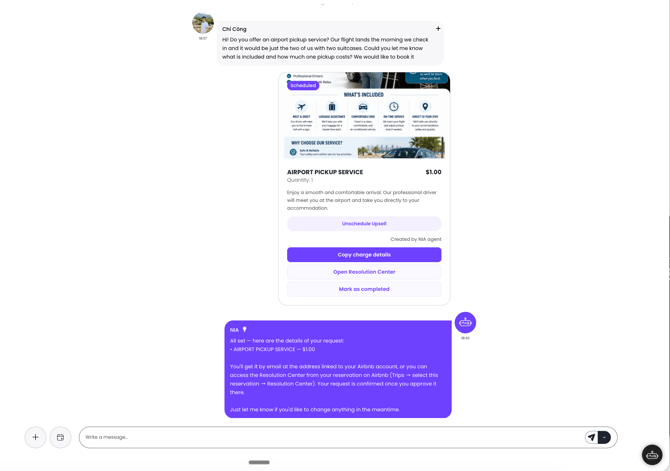
Step 4: Submit the Request in Airbnb
After selecting Open Resolution Center, Airbnb opens the Resolution Center.
Complete the following steps:
- Select Extra Service.
- Fill out the requested information.
- Paste the copied description into the Note field.
- Enter the requested amount.
- Submit the Resolution Center request.
.png?width=670&height=575&name=image%20(2).png)
After submitting the request, return to Jurny.
The submitted request will now appear in the Resolution Center section of the conversation and is linked to the original upsell offer.
Caution: Make sure the request is linked to the correct upsell before submitting it to the guest.
Step 5: Guest Pays Through Airbnb
The guest receives the Resolution Center request directly from Airbnb.
They can review the request and complete payment using Airbnb's standard payment process.
No additional action is required inside Jurny while payment is pending.
.png?width=670&height=349&name=image%20(4).png)
Step 6: Jurny Updates the Booking Automatically
Once Airbnb confirms payment, Jurny automatically syncs the booking.
The following information is updated automatically:
- The accepted upsell is assigned to the booking.
- Booking finances are updated.
- Total payout is recalculated.
- The Resolution Center request status is updated.
No manual bookkeeping is required after payment is completed.
.png?width=670&height=477&name=image%20(3).png)
Tip: After the guest pays, everything else happens automatically inside Jurny.
Why This Process Is Only Partially Automated
Hosts often ask why Jurny cannot submit the Resolution Center request automatically.
The answer is simple:
Airbnb's Resolution Center does not provide API access.
Because of this limitation, no property management system—including Jurny—can automatically create and send Resolution Center payment requests.
Jurny automates everything technically possible:
- ✅ NIA offers the upsell.
- ✅ Guest acceptance is tracked.
- ✅ Resolution Center request details are generated.
- ✅ Charge details are prepared for you.
- ✅ Booking finances update automatically after payment.
The only manual task is submitting the payment request within Airbnb's Resolution Center.
Warning: This manual step is required by Airbnb's platform and cannot currently be automated.
Frequently Asked Questions
-
Can Airbnb guests now purchase upsells?
Yes. Airbnb bookings now support upsells using the Resolution Center workflow.
-
Does NIA send the upsell automatically?
Yes. NIA can either respond to guest requests or proactively offer upsells through your configured automations.
-
Do I still need to use Airbnb's Resolution Center?
Yes. After the guest accepts the offer, you'll open the Resolution Center from Jurny, complete Airbnb's Extra Service form, and submit the payment request.
-
What should I copy into the Resolution Center?
Use Copy Charge Details in Jurny and paste the copied information into the Note field of Airbnb's Extra Service form.
What happens after the guest pays?
Jurny automatically updates the booking by:
- Assigning the upsell to the booking
- Updating booking finances
- Updating the total payout
- Updating the Resolution Center request status
If you need help or have any questions, don’t hesitate to reach out. Contact your Customer Success Manager or our support team at support.jurny.com – we’re happy to assist.