
Jurny allows you to generate a Profit & Loss (P&L) report directly from the Owner Statements section. This report gives you a clear financial view of revenue, expenses, and overall performance for a selected period.
Quick Navigation Index
To easily navigate through this guide, click on any of the sections below to jump directly to the information you need:
What Is a P&L Report?
The P&L report provides a financial snapshot of your property or portfolio over a selected date range. It helps you:
-
Track revenue and expenses
-
Analyze profitability
-
Review rental activity and extras
-
Make data-driven business decisions
In Jurny, the P&L report is generated through Owner Statements using an accrual basis view.
Where to Generate a P&L Report
-
Go to Reporting in the left-hand menu
-
Click on Owner Statements
Note:
P&L reports are generated from Owner Statements, not as a standalone report.
Step-by-Step: Creating a P&L Report
Step 1: Create a New Owner Statement
-
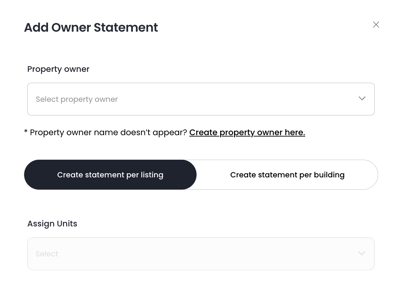
In the Owner Statements section, click Add Owner Statement
-
Select the Owner
-
Select the Unit(s) you want to include
Step 2: Select the Date Range
-
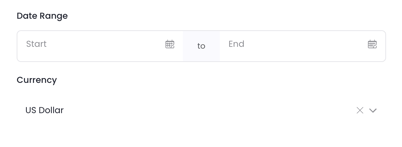
Choose the start and end dates for the report
Example: December 1st – December 31st
Step 3: Enable Accrual Basis
-
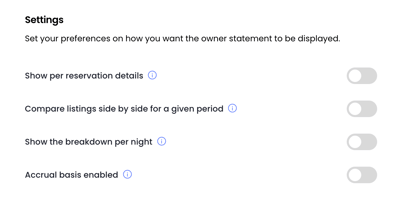
Make sure the Accrual Basis toggle is enabled
Important:
The P&L report requires Accrual Basis to be enabled in order to generate the correct financial views.
Step 4: Generate the Statement
-
Click Add Owner Statement
-
The report will be created automatically

Once generated, the P&L data becomes available inside the owner statement.
Understanding the P&L Views
After opening the owner statement, you’ll have access to multiple views of the P&L report:
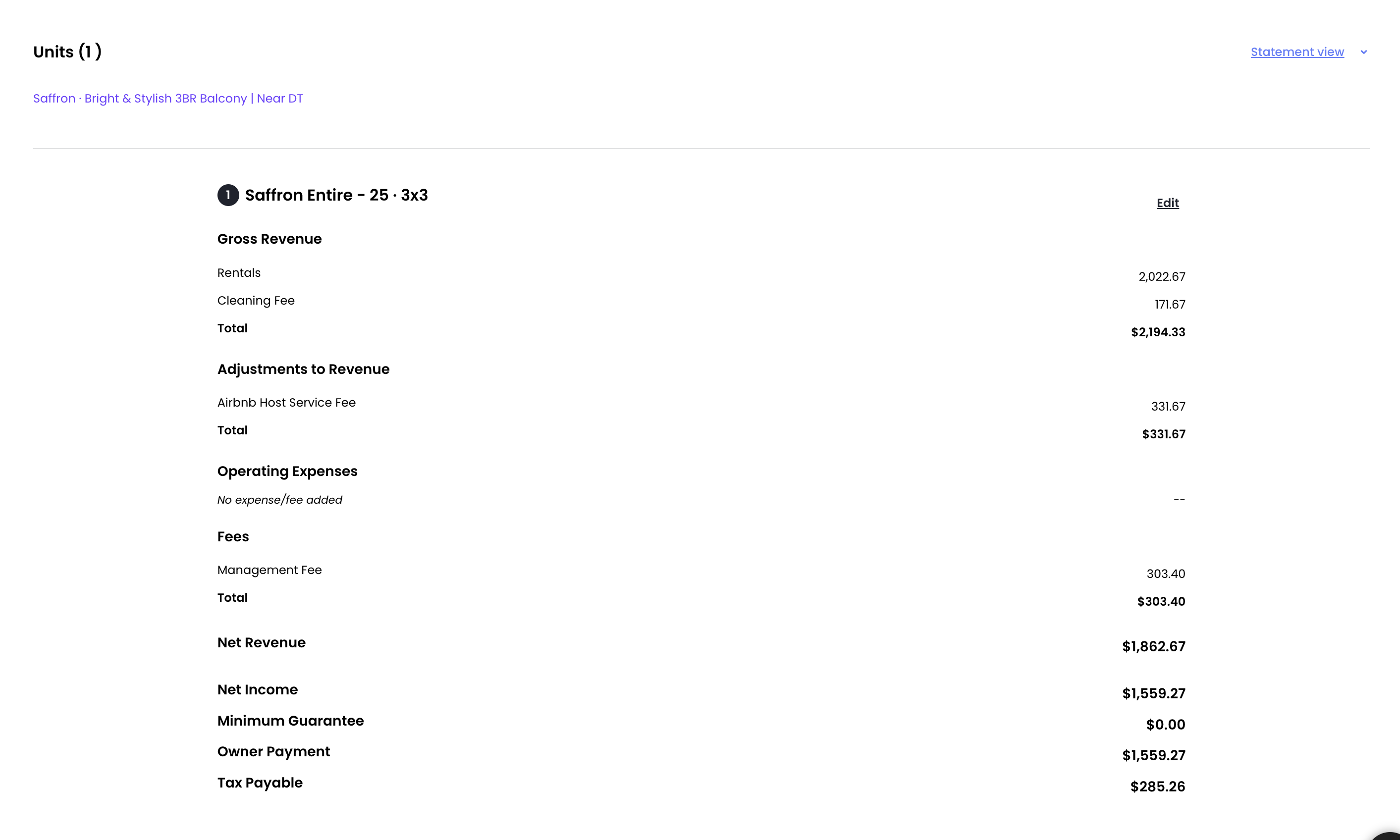
P&L Statement View
-
High-level overview of income and expenses
-
Totals for the selected period
Reservation View
-
Detailed breakdown per reservation
-
Includes:
-
Rental revenue
-
Extras
-
Expenses
-
Totals per booking
-

This allows you to analyze performance at both a summary and reservation level.
Common Errors & How to Fix Them
Error: Owner Has No Business Model
If you see an error when generating the report, it usually means:
-
The owner does not have an Owner Agreement / Business Model set up
How to Fix It
-
Make sure the owner has an Owner Agreement configured
-
Once the business model is set, you can generate the owner statement and P&L report successfully
Final Notes
-
P&L reports are generated per owner statement
-
Accrual basis must always be enabled
-
Different owners or units require separate statements
-
Reports can be reviewed anytime after creation
If you need help or have any questions, don’t hesitate to reach out.
Contact your Customer Success Manager or our support team at support.jurny.com – we’re happy to assist.