
Understanding Channel Markups
Markups allow you to increase the amount guests pay on booking channels. They are commonly used to offset OTA commissions, increase revenue, or adjust pricing for specific distribution channels.
The available markup options vary depending on the integration.
Airbnb & Vrbo Markup Options
When connecting directly to Airbnb or Vrbo through Jurny, you have two markup options.
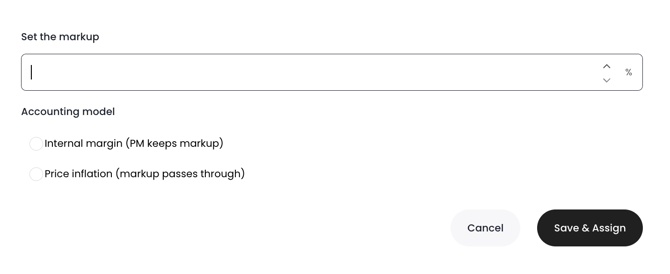
Option 1: Internal Margin
The markup percentage is applied to the rental amount, but the entire markup is retained by you.
This markup:
- Increases the guest-facing rental price.
- Is not visible on the owner's statement or payout.
- Does not affect the owner's earnings.
Example
- Base nightly rate: $200
- Internal Margin: 10%
Guest pays:
- $220
Owner statement:
- Rental amount remains $200
You retain the additional $20 as internal margin.
Tip: Use Internal Margin when you want to increase your revenue without changing the owner's reported rental income.
Option 2: Price Inflation
The markup percentage is applied to the rental amount in the same way, but it becomes part of the rental revenue.
This markup:
- Increases the guest-facing rental price.
- Is included in the owner payout calculation.
- Is visible on the owner's statement.
Example
- Base nightly rate: $200
- Price Inflation: 10%
Guest pays:
- $220
Owner statement:
- Rental amount is $220
The increased amount is treated as part of the rental revenue.
Note: Because Price Inflation becomes part of the rental income, it will be reflected in owner reporting and payouts.
Booking.com and Other Channels
Our distribution page provides two separate markup settings when connecting channels.
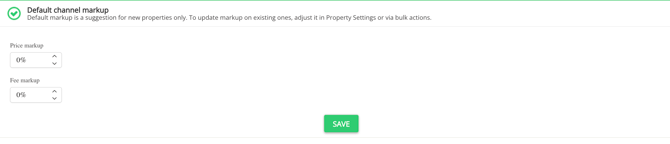
Option 1: Price Markup
Price Markup increases the property's base rental price before it is sent to the connected sales channel.
This affects:
- Nightly rates
- Accommodation price
- The primary rental amount guests see
Use Price Markup when you want to increase the property's advertised nightly price across a channel.
Example
- Nightly rate: $200
- Price Markup: 10%
Displayed nightly rate:
- $220
Option 2: Fee Markup
Fee Markup increases the value of fees, rather than the nightly rental price.
Depending on your property setup, this can include fees such as:
- Cleaning fees
- Booking fees
- Service fees
- Other mandatory charges supported by the channel
For example:
- Cleaning Fee: $100
- Fee Markup: 10%
Cleaning fee sent to the channel:
- $110
The nightly rate remains unchanged.
Fee markup was introduced to give property managers more flexibility in their pricing strategy. It can be used independently or together with Price Markup to help offset channel commissions or operational costs while allowing separate control over accommodation pricing and fees.
Tip: If you only want to increase cleaning or service fees without changing the nightly rate, use Fee Markup.
Note: Fee Markup only affects fees that are supported and synchronized by the connected sales channel. Unsupported or optional fees may not be impacted.
Which Option Should You Use?
| Option | What It Changes | Visible in Owner Payout? |
|---|---|---|
| Internal Margin (Airbnb & VRBO) | Rental amount | No |
| Price Inflation (Airbnb & VRBO) | Rental amount | Yes |
| Price Markup (Booking.com & Other Channels) | Base rental/nightly price | Depends on the connected channel's pricing display |
| Fee Markup (Booking.com & Other Channels) | Fees such as cleaning or service fees | Depends on the connected channel's fee handling |
If you need help or have any questions, don’t hesitate to reach out. Contact your Customer Success Manager or our support team at support.jurny.com – we’re happy to assist.