
Quick Navigation Index
What Is an Inquiry?
An Inquiry is a message sent by a guest before they are ready to book.
Guests typically send inquiries when:
-
The dates are unavailable
-
They want to ask a question
-
They’re hoping for a special deal, promo, or custom offer
Important things to know about inquiries:
-
Dates do NOT need to be available
-
The calendar is not blocked
-
No payment is involved
-
The guest is not committing to a reservation
Note: Most guests use inquiries to start a conversation, not to confirm a stay.
Where Inquiries Come From
Inquiries can come from the following channels:
-
Airbnb
-
Vrbo
-
Booking.com
-
Other connected OTAs
Tip: Regardless of the channel, inquiries always behave the same way—no calendar block and no expiration timer.
Inquiry Flow (Step-by-Step)
-
Guest sends an inquiry
-
Dates may be available or unavailable
-
Guest asks a question or requests a deal
-
-
Host replies
-
Answer questions
-
Offer a custom deal or special request (if applicable)
-
-
Optional: Convert inquiry into a booking
-
Host sends a special offer
-
Guest accepts and completes the booking
- Hosts have the option to pre-approve an inquiry on Airbnb as well to allow that guest to book when they are ready.
-
-
If booked
-
A new booking message thread is created
-
The original inquiry thread remains for reference
-
Tip: Inquiries are great for upselling, offering discounts, or clarifying expectations before a booking.
What Is a Request to Book?
A Request to Book means the guest is ready to reserve the property.
Guests send a request to book when:
-
Dates are available
-
They want to confirm the reservation
-
Instant Book is not enabled, or
-
The guest does not meet minimum requirements (common with Airbnb)
Important things to know about requests to book:
-
Dates must be available
-
Host approval is required
-
There is a validity period to respond
Where Requests to Book Come From
Requests to book can come from:
-
Airbnb
-
Vrbo
-
Jurny Booking Engine
-
Other supported booking channels that require host approval
Note: Channels with Instant Book enabled may bypass requests entirely and create confirmed bookings immediately.
Request to Book Flow (Step-by-Step)
-
Guest submits a request to book
-
Dates are available
-
Guest agrees to pricing and house rules
-
-
Calendar is temporarily blocked
-
Dates are held while awaiting host action
-
-
Validity period begins
-
Host has a limited time to accept or reject
-
If no action is taken, the request expires automatically
-
-
Host decision
-
Accept → Booking is confirmed
-
Reject → Dates are released back to the calendar
-
Caution: If the request expires, the guest must submit a new request to book.
How to Accept or Decline a Booking Request
You have a few options to accept or decline the request from your Jurny account!
-
From the Jurny Inbox
- Open the reservation from your Jurny inbox
- On the upper right side of your screen, you can click the gear icon & you'll have the option to either accept or decline.
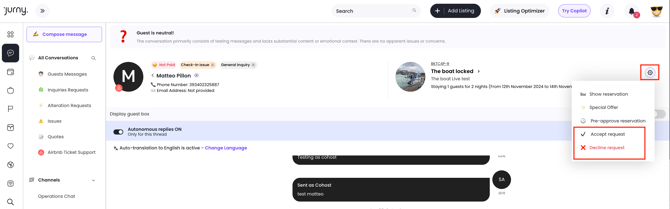
2. From the Reservations page
a. Open the reservation from the reservations page of your Jurny account.
b. Once the booking is open, you should see the accept & decline button from the summary page.
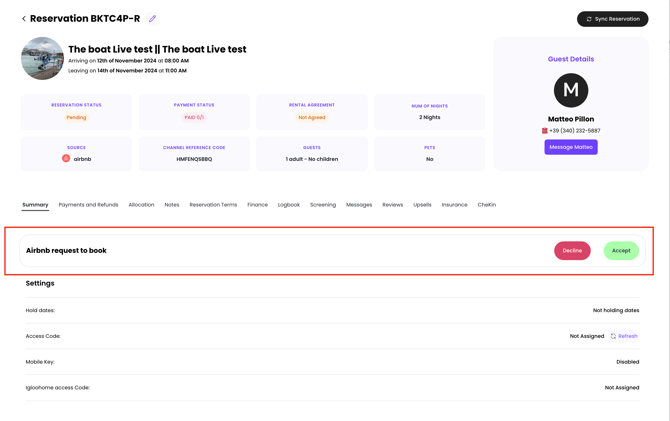
Warning: Ignoring a request to book can hurt response metrics on some platforms.
Calendar Blocking Rules
The length of time the calendar is blocked when you get a booking request is generally 24 hours. You'll have that time to either accept or decline the request.
General behavior:
-
The block starts as soon as the request is submitted
-
The block ends when:
-
The host accepts
-
The host declines
-
The request expires
-
| Scenario | Calendar Status |
|---|---|
| Inquiry | ❌ Not blocked |
| Request to Book (pending) | ✅ Temporarily blocked |
| Request declined or expired | ❌ Released |
| Booking accepted | ✅ Blocked |
Accepting or Rejecting: Inquiry vs. Request to Book
Inquiry
-
You do not accept or reject
-
You simply reply
-
Optional: send a special offer
Request to Book
-
You must accept or reject
-
Action is required within the validity period
-
A decision affects calendar availability
Message Threads Explained
When an inquiry turns into a booking:
-
The original inquiry thread stays
-
A new booking message thread is created
-
All future booking communication happens in the new thread
Note: This is expected behavior and helps keep conversations organized.
Key Differences at a Glance
| Feature | Inquiry | Request to Book |
|---|---|---|
| Dates must be available | ❌ No | ✅ Yes |
| Calendar blocked | ❌ No | ✅ Temporarily |
| Guest ready to book | ❌ No | ✅ Yes |
| Host approval required | ❌ No | ✅ Yes |
| Has expiration timer | ❌ No | ✅ Yes |
| Can become a booking | ✅ Yes | ✅ Yes |
If you need help or have any questions, don’t hesitate to reach out. Contact your Customer Success Manager or our support team at support.jurny.com – we’re happy to assist.