
What the Payment Link Feature Does
The Payment Link feature allows you to securely request a guest’s credit card through a shareable payment link.
When a guest submits their card:
-
If there is an outstanding balance, the system will charge the card immediately.
-
If there is an outstanding payment scheduled for a future date, the card will be securely stored and the amount will be charged on the payment’s due date.
-
If there is no outstanding payment, the card will be stored securely without charging anything.
How to Send a Payment Link
-
Go to the Reservations section in your dashboard.
-
Open the reservation for the guest you want to collect payment from.
-
Navigate to the Payments & Refunds Tab
-
Locate the Credit Card section.
In the Credit Card section:
-
Click the Send Payment Link Button.
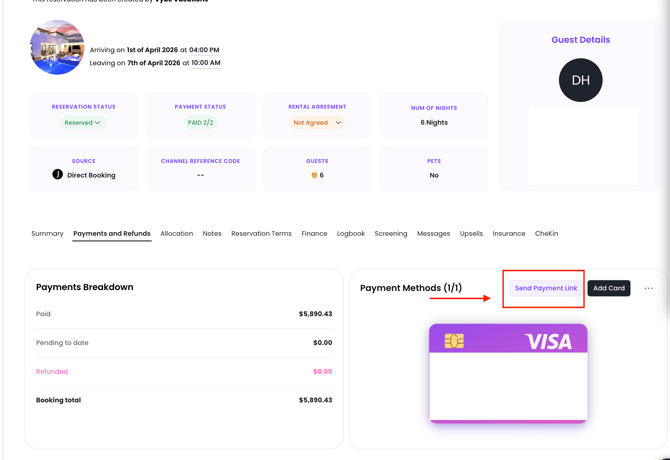
A Payment Link popup window will appear.
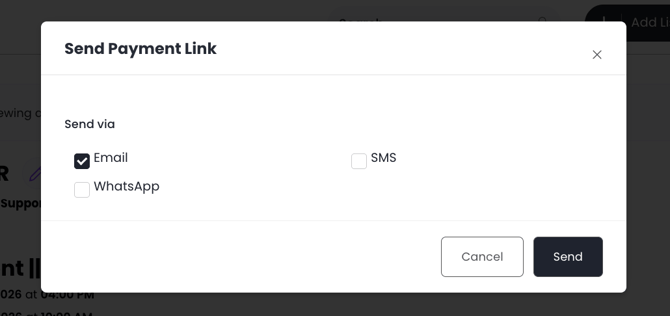
Choose How to Send the Payment Link
In the popup, you can choose how to send the payment request to the guest.
-
Email
-
SMS
-
WhatsApp (If enabled on your Jurny account)
Simply select your preferred option and send the link.
If you need help or have any questions, don’t hesitate to reach out. Contact your Customer Success Manager or our support team at support.jurny.com – we’re happy to assist.