
📘 What is a Guest Folio?
The Guest Folio is a system-generated PDF that acts as a receipt for your guest’s stay. It includes:
-
Guest and reservation details
-
Stay dates, confirmation number, and guest count
-
Pricing breakdown and payment history
-
Your company’s name, contact details, and logo
Hosts can easily generate, download, or email the folio directly from the reservation screen.
Note: Guests cannot access folios themselves. Only hosts or approved users can create and send them.
🔍 Where to Find the Guest Folio
You can access and generate a folio for any reservation by following these steps:
-
Go to your Reservations page.
-
Click on the specific guest reservation.
-
In the reservation view, go to the Summary tab.
-
Scroll to the Documents section.
-
On the right side, click the Folios tab.
⚙️ How to Generate a Folio
Inside the Folios tab:
-
Click the Generate Folio button.
-
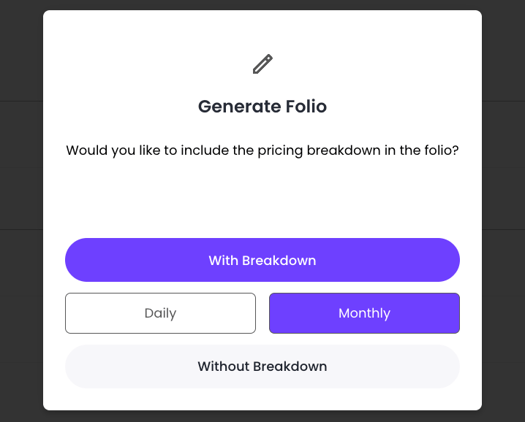
Select if you want to generate a folio with a breakdown or without a breakdown
- If you choose With Breakdown, you can then choose if you want a daily or a monthly breakdown
-
After generating, you’ll see options to:
-
-
View the folio
-
Download the PDF
-
Email the folio to the guest with one click
-
Caution: The folio will be sent to the email address saved in the reservation. Double-check that it’s correct before clicking “Email.”
🖋 Customizing Your Company Info
Your guest folios automatically show your:
-
Company name
-
Logo
-
Phone number
-
Email
-
Business address
To customize this information:
-
Go to your Profile Settings in Jurny.
-
Follow this guide to set up or update your profile info:
👉 How to Set Up Your Profile in Jurny
Note: Updating your profile ensures every folio sent to guests reflects your correct branding and contact details.
🧾 What’s Included in the Folio?
Each folio includes all the information your guest needs, including:
🏨 Reservation Info:
-
Guest name and contact
-
Stay dates and length
-
Reservation number
-
Property name and address
💵 Financial Summary:
-
Total rent and extra charges
-
Refunds or adjustments
-
Payments made and remaining balance
-
Method of payment (e.g. Cash, Card)
📊 Pricing Breakdown:
A day-by-day summary showing:
-
Date
-
Rate
-
Discounts or extra charges
-
Total per night
💰 Payment History:
-
List of all payments, refunds, and pending amounts
-
Payment method and dates
-
Total paid and balance due
If you need help or have any questions, don’t hesitate to reach out. Contact your Customer Success Manager or our support team at support.jurny.com – we’re happy to assist.