Security deposits protect your properties against damages—but how they’re handled depends on the tools you use. Jurny supports multiple approaches, each with different fee structures, limitations, and guest experiences.
Quick Navigation Index
To easily navigate through this guide, click on any of the sections below to jump directly to the information you need:
Why Security Deposit Setup Matters
How you collect and release security deposits impacts:
-
Processing fees
-
Guest experience
-
Cash flow
-
Risk exposure
-
Dispute and refund handling
Choosing the wrong setup can result in unnecessary fees, guest frustration, or limited protection—especially for longer stays.
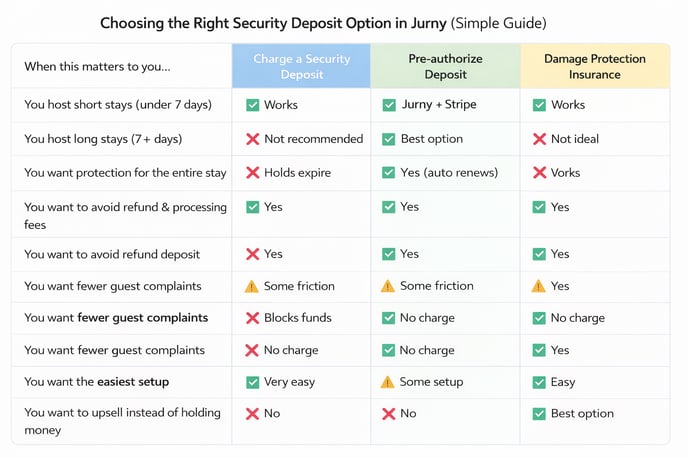
Option 1: Security Deposits via Stripe + Jurny
When using Stripe directly through Jurny, security deposits are handled based on your Stripe account type.
How It Works
-
Jurny attempts to place a pre-authorization hold on the guest’s card
-
The hold duration is dictated entirely by Stripe
Stripe Hold Limits
-
Standard / Blended Stripe accounts:
-
Holds last up to 7 days
-
-
IC+ Stripe accounts (typically granted at ~$1M+ annual volume):
-
Holds last up to 30 days
-
If your Stripe account does not support extended pre-authorizations:
-
Stripe will charge the deposit
-
Then refund it later
Processing fees apply on both the charge and the refund
Option 2: Security Deposits via Autohost (Recommended)
Autohost offers the most flexible and guest-friendly approach to refundable security deposits.
How It Works
-
Autohost places a card hold (not a charge)
-
The hold is automatically released based on your rules
-
No Stripe processing fees apply unless you claim part or all of the deposit
Key Benefits
-
No upfront charge to the guest
-
No fees on fully released deposits
-
Automatic release logic
-
Cleaner accounting
Best for:
Hosts who want to avoid fees on canceled reservations and refunded deposits.
Important Considerations for Longer Stays
Stripe enforces strict rules on how long pre-authorizations can remain active.
The Challenge
For stays longer than 7 days:
-
Stripe releases the original hold automatically
-
This can leave your property unprotected mid-stay
Autohost’s Workaround
Autohost can:
-
Automatically renew the pre-authorization every 7 days
-
Maintain protection for the entire stay
Things to Be Aware Of
-
Each renewal carries an additional Autohost fee (approx. $0.84 per renewal — confirm with Autohost)
-
Guests may temporarily see overlapping holds on their card (e.g., $1,000 instead of $500)
-
Depending on the guest’s bank, releases may take hours or days
Caution:
While effective, recurring holds can cause guest confusion if not clearly explained in advance.
Alternative Option: Damage Protection Insurance
Many hosts are now offering damage protection insurance instead of traditional security deposits.
How It Works
-
Guests choose between:
-
A refundable deposit (e.g., $1,000 hold), or
-
A one-time, non-refundable insurance fee (e.g., $180)
-
Why Guests Prefer This
-
No large amounts blocked on their card
-
More spending flexibility during travel
Why Hosts Like It
-
Higher conversion rates
-
Additional upsell revenue
-
Less friction at check-in
-
Coverage without card holds
Providers like RentalGuardian are commonly used for this purpose.
Industry Insight:
In most cases, guests prefer paying a smaller insurance fee instead of having large amounts blocked on their card.
Choosing the Right Option
| Use Case | Recommended Setup |
|---|---|
| Short stays (under 7 days) | Stripe pre-authorization |
| Long stays | Autohost with renewal |
| Avoiding all refund fees | Autohost |
| Reducing guest friction | Damage protection insurance |
| Upsell-focused strategy | Insurance alternative |
The right choice depends on your stay length, volume, and guest profile.
If you need help or have any questions, don’t hesitate to reach out.
Contact your Customer Success Manager or our support team at support.jurny.com – we’re happy to assist.