
Quick Navigation
To easily navigate through this guide, click on any of the sections below to jump directly to the information you need:
• How to Add NIA FAQs to Jurny
• Creating a Collection for Your FAQs
• Adding FAQs to NIA
What Are NIA FAQs and Why Are They Important?
NIA FAQs are pre-set answers to common questions that guests may ask during their stay. By adding these FAQs to Jurny, you’re empowering NIA (our AI assistant) to deliver accurate, context-specific responses based on the guest’s inquiries. This ensures that NIA can assist with everything from check-in details to property amenities, house rules, and local recommendations.
The more thorough your FAQ setup, the more efficient NIA will be in supporting guests, reducing your workload, and improving overall guest satisfaction.
How to Add NIA FAQs in Jurny
To begin adding FAQs, follow these simple steps:
1. Access the NIA Control Panel:
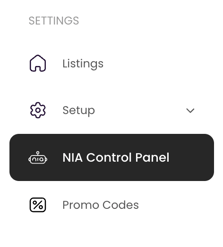
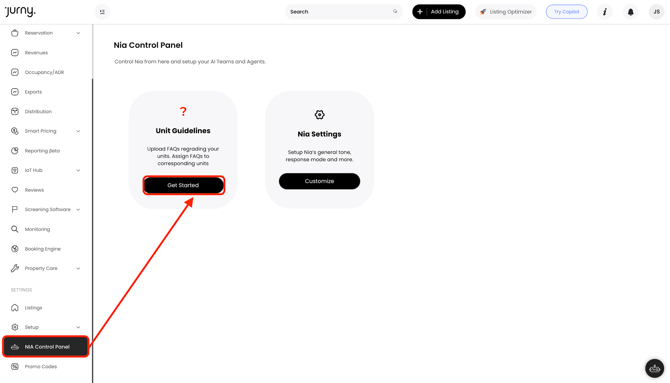
• In your Jurny account, go to the NIA Control Panel located in the left-hand side panel at the bottom of your screen.
2. Access FAQs Page:
• From the NIA Control Panel, click on Unit Guidelines. This is where you can start adding FAQs.
• You’ll first need to create a collection, which acts as a folder to organize your FAQs. Collections allow you to keep your FAQs neatly organized, making it easier to assign them to listings and categories.
3. Creating a Collection & Adding FAQs:
- Click on Add New and choose what you want to do from the four options below:
- Add New FAQ - Adding a single FAQ and assigning it to a collection
- Add New Collection - Collections work like folders. You can create a collection for General FAQs, which can be assigned to all your listings, or create a collection for specific properties, where you can add property-specific FAQs.
- AI Generated FAQs - quickly create suggested questions and answers for your property based on your listing details, amenities, and policies.
- Import FAQs from a file - upload multiple FAQs at once using a formatted document (such as a CSV or template file).

Tip: We recommend creating collections first, then adding your FAQs either by manually adding them one by one or uploading them, so it's easier for you to assign the FAQs to collections.
NIA Proposed FAQs
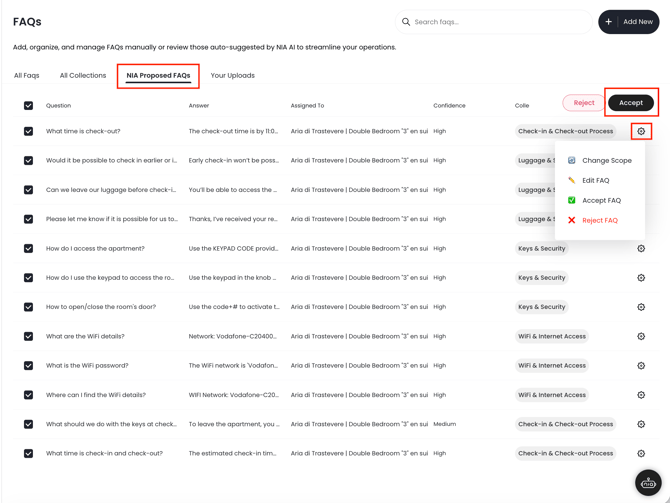
When NIA generates FAQs for you, you have the option to Accept, Reject, Edit the FAQ, or Change the Scope. You can either do it one by one or accept the FAQs NIA generated in bulk by simply selecting all FAQs and clicking the Accept button on the upper right side of the screen.
Not sure what FAQs to add? Don’t worry—we’ve got you covered! Click here to check out our suggestions.
That’s it! Once you’ve created your collections and added your FAQs, NIA will be equipped with the information it needs to assist guests more effectively, providing better suggestions and more accurate answers. This will improve your guest communications and save you time.
If you have any questions or need further assistance, don’t hesitate to reach out to your Customer Success Manager or contact our support team at support@jurny.com.