
Payment schedules allow you to control when and how guests are charged for direct bookings in Jurny—reducing risk, preventing missed payments, and improving the guest experience.
Quick Navigation Index
To easily navigate through this guide, click on any of the sections below to jump directly to the information you need:
What Are Payment Schedules?
In short-term rentals, payment schedules define:
-
When guests are charged
-
How much they are charged at different times
They help you:
-
Avoid unpaid or partially paid bookings
-
Set clear expectations with guests
-
Automate payments and reduce manual work
Jurny gives you full flexibility so you can match your payment logic to your business model.
Note: Payment schedules in Jurny apply only to direct bookings and certain OTAs.
OTAs like Airbnb and Booking.com have their own payment rules since they manage payments for Hosts.
Where to Find Payment Schedules
-
From your left-hand menu, go to:
Setup → Booking & Payments -
Click on the Payment Schedules tab.
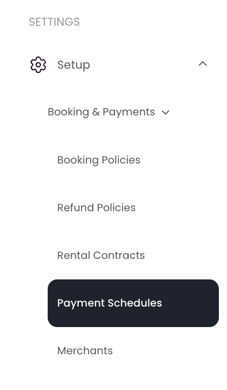
This is where you’ll create and manage all your payment rules.
How Payment Schedules Work in Jurny
Each Payment Schedule defines:
-
When the payment is collected (relative to booking or check-in)
-
How much is charged at that time (full, partial, or fixed amount)
You can create multiple schedules if needed and apply them to different listings or scenarios.
How to Create a Payment Schedule
Creating a payment schedule in Jurny lets you decide when each portion of the reservation total is collected and how much guests will pay at each stage. Here’s how to set it up:
1. Add an Internal Name
Start by giving your payment schedule a name.
This is only for your internal reference, so feel free to name it anything that helps you recognize the structure.
Examples:
-
100% at Booking
-
50/25/25 Schedule
-
Mid-Term Monthly Plan
2. Set Up the Timeline (Payment Steps)
The timeline is where you define when payments will be taken and how much each payment will be.
You can add up to three different payment steps, and each step allows you to choose:
-
When the payment should occur
-
At time of booking
-
Days after booking
-
Days before check-in
-
-
How much will be charged
-
100%
-
Flat amount
-
Percentage of rent and fees
-
This allows you to customize your schedule to match your business model.
Example Timeline Setup
You might create a schedule like this:
-
50% at time of booking
-
25% 30 days before check-in
-
25% 15 days before check-in (or the final remainder, including fees or deposits)
This structure spreads the guest’s payments while still ensuring you collect funds well before arrival.
3. Enable Automatic Split Payments (Optional)
You’ll also see an option to enable Automatic Split Payments.
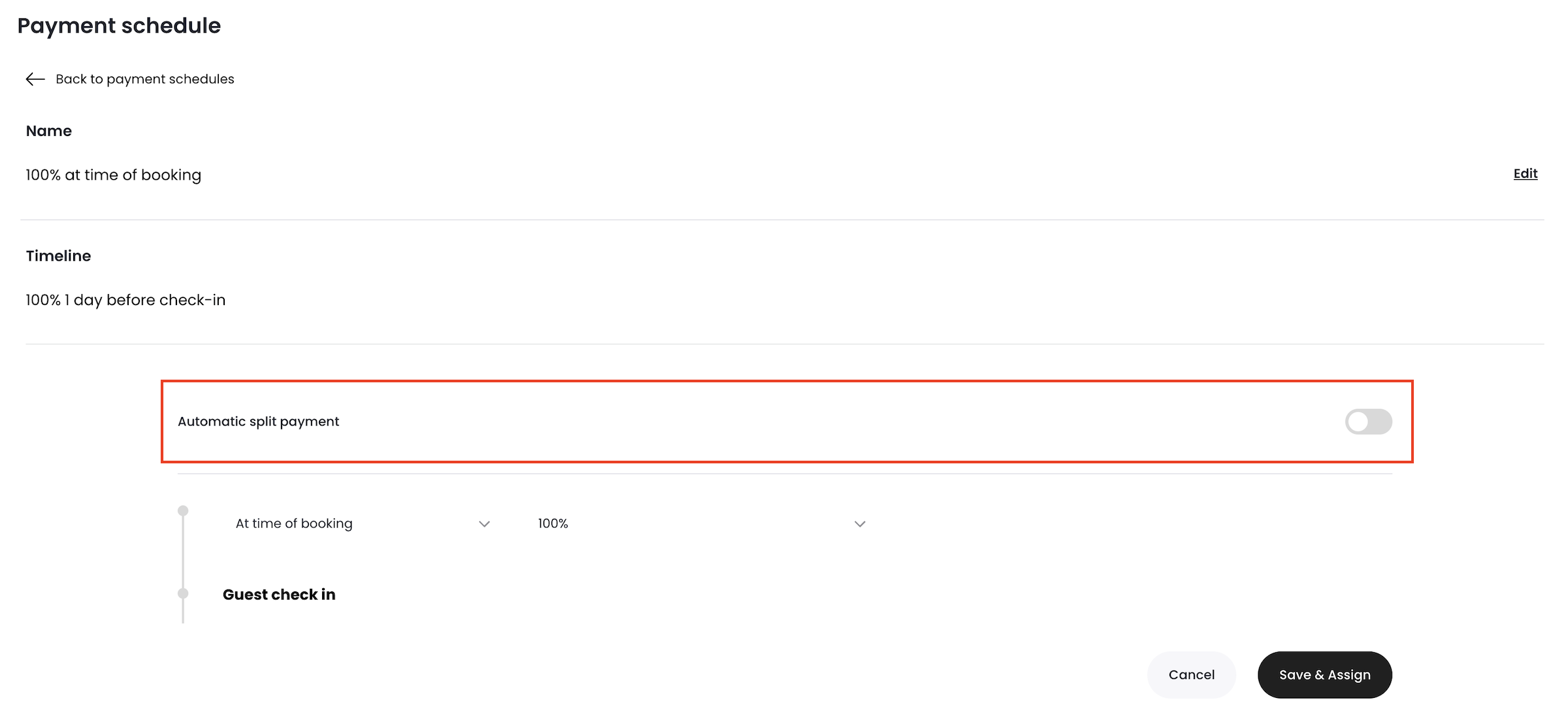
This setting is only recommended for mid-term and long-term stays.
Why? Because when enabled Jurny automatically splits the total reservation amount into monthly installments and charges the guest automatically each month.
This is ideal for:
-
Stays longer than 28 days
-
Monthly rentals
-
Corporate housing
-
Student housing
-
Hosts who want payments handled automatically without manual steps
Tip
Avoid using automatic split payments for short-term rentals—it’s designed specifically for longer bookings where monthly billing makes sense.
Use percentage-based schedules if you often work with deposits and balances.
Recommended Setup
If you’re unsure which structure to use, we recommend keeping it simple:
At time of booking = 100%

Why?
-
Reduces risk of unpaid or partially paid reservations
-
Simplifies accounting and tracking
-
Fewer follow-ups and manual payment reminders
Best Practice: Especially for short stays and high-demand markets, charging 100% at booking provides the most security.
Things to Keep in Mind
-
Payment Schedules apply to direct bookings or certain OTAs like VRBO.
-
OTAs like Airbnb and Booking.com (Payments by booking) have their own payment rules since they manage payments for Hosts.
-
Make sure your payment gateway (Stripe, Lynnbrook, Syspay) is connected and active before relying on automated payments.
-
Always double-check your schedule logic to avoid charging too late or too little.
Important Tip About OTA Requirements
Tip:
Most OTAs (like Vrbo) require that some portion of the payment is collected at the time of booking, even for flexible cancellation policies.To stay consistent and avoid issues when integrating to OTAs:
Always collect at least a deposit at the time of booking, and
Collect the remaining balance X days before check-in.
This helps ensure a smooth booking experience and prevents last-minute cancellations with unpaid balances.
If you need help or have any questions, don’t hesitate to reach out. Contact your Customer Success Manager or our support team at support.jurny.com – we’re happy to assist.